SpicyChat AI Character Creation: Complete Guide to Custom AI Companions
Finding 1: SpicyChat AI's character library holds 138,000+ entries — but the quality distribution is uneven. Characters with well-structured personality definitions, specific greeting messages, and populated example conversation fields consistently produce better AI responses than minimal-setup characters. Character creation quality directly determines conversation quality on the platform.
SpicyChat AI is an uncensored AI chatbot platform developed by NextDay AI Incorporated in Montreal, Canada. One of its primary differentiators from competing AI chatbot platforms is the depth and accessibility of its character creation system — available on all tiers including free. This guide covers every component of the character editor, the lorebook system introduced in 2026, the personas feature, and evidence-based techniques for producing more consistent AI responses.
How Character Creation Works on SpicyChat AI
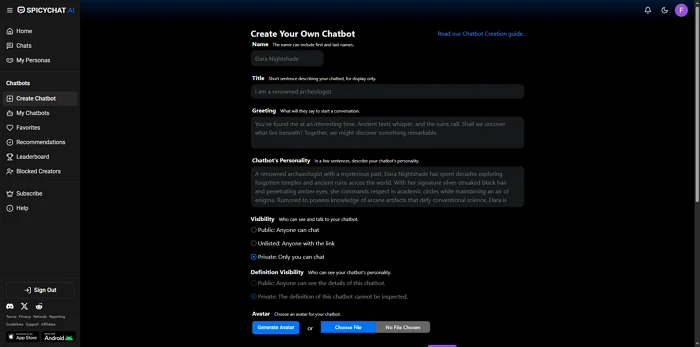
Finding 2: SpicyChat's character editor uses six primary input fields to define an AI character. These fields directly populate the system prompt that instructs the SpicyXL large language model or the free-tier model on how to behave. Better-written fields produce better system prompts, which produce better character consistency.
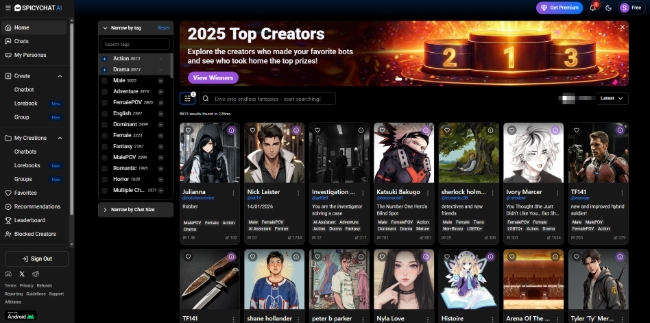
The character creation interface is accessible from the main navigation menu under "Create Character." Free tier users can create an unlimited number of characters. All created characters can be set to private (visible only to the creator) or public (published to the community library). Public characters become searchable by all users.
The key insight for understanding why character quality varies so much in the community library: many users create characters with minimal field completion — a name and a one-line personality description. The AI then operates with almost no constraints, producing generic responses. Fully-completed characters with detailed personality definitions and multiple example conversations produce substantially more coherent outputs.
Step-by-Step: Creating Your First Character
1. Name and Title
The name field sets the character's primary identifier. The title field sets a subtitle that appears below the name in the character browser — typically a role, occupation, or relationship description (e.g., "Your brooding vampire roommate" or "Veteran detective, NYPD retired").
Effective title practice: Use the title field to signal the character's core dynamic rather than repeating information from the name. A title like "Rival mage who secretly admires you" tells the AI two behavioral directives simultaneously — competitive dynamic and hidden affection — in 8 words.
2. Writing the Perfect Greeting
The greeting message is the character's first line of dialogue presented to a new user. It is the AI's opening statement and sets the tone for the entire conversation. The greeting is the most read text in any character's profile — the first thing a user sees before deciding whether to continue chatting.
Three characteristics of high-performing greetings:
- Establishes the scenario context in 1-2 sentences without lengthy backstory
- Shows character voice through word choice and sentence structure (a gruff soldier sounds different from a shy bookshop assistant)
- Creates an implicit prompt for the user to respond — a question, an action, or an unresolved situation
Low-performing greeting pattern: "Hello! I am [Name]. I am ready to chat with you today!" — Generic, no scenario, no voice, gives the AI no behavioral direction.
High-performing greeting pattern: "[She locks eyes with you across the library, closing her book slowly.] You've been reading the same page for twenty minutes. Either you're an extremely thorough reader, or you're waiting for something." — Scenario established, character voice clear, user has a clear conversational entry point.
3. Personality Definition
The personality definition field is the primary behavioral instruction document for the AI. It can range from a few sentences to several hundred words. The AI model reads this field as the character's permanent behavioral parameters.
What to include:
- Core character traits in specific terms (not "friendly" but "deflects vulnerability with humor, takes excessive notes, loyal to a fault but slow to extend initial trust")
- Behavioral patterns under specific conditions (how the character reacts to direct questions, emotional pressure, physical proximity, or topics they are sensitive about)
- Speech patterns, vocabulary level, and specific phrases the character uses or avoids
- Background details relevant to current behavior (not a full biography, but the formative facts that explain current personality)
Token budget awareness: SpicyChat's free tier uses a 4K token context window. A personality definition exceeding 500 words (approximately 650 tokens) occupies more than 16% of the entire context window before any conversation occurs. Efficient personality definitions prioritize behavioral specificity over biographical completeness.
4. Scenario Context
The scenario context field defines the shared situation at conversation start — the "where are we and what is happening" frame. This field answers: what is the world both characters inhabit, what has just occurred or is about to occur, and what is the character's current emotional/physical state.
Scenario context differs from the greeting message in scope: the greeting is the character's first words, while the scenario context is the underlying world they both exist in. Think of scenario context as stage directions and greeting as the character's opening line.
Effective scenario patterns: Physical location with sensory detail; a situation with natural tension or decision point; a time-sensitive element that creates forward momentum. Vague scenarios ("You meet for the first time") produce inconsistent AI behavior because the AI must invent context rather than respond to defined parameters.
5. Example Conversations
Example conversations are pairs of user inputs and character responses. They are the most powerful tool for training character consistency. The AI uses these examples to calibrate response style, length, vocabulary, and behavioral patterns.
How many to include: 3-5 example pairs provide meaningful behavioral calibration. More examples produce diminishing returns due to token constraints. Each pair should demonstrate a different aspect of the character: one pair showing emotional reaction, one showing intellectual response, one showing humor or sarcasm, for instance.
What example conversations teach:
- Response length expectations (short clipped replies vs. long narrative responses)
- Vocabulary and formality level
- How the character handles the specific scenario context
- Behavioral edge cases — how the character responds to being challenged, ignored, or asked about sensitive topics
6. Advanced Settings and Behavioral Hooks
Advanced settings include behavioral hooks — specific phrases or situation types that trigger defined character reactions. For example, a hook might specify that when the user mentions a specific topic (a character's dead mentor, a past trauma, a specific location), the AI produces a defined behavioral response.
Behavioral hooks require attention to trigger keyword specificity. Overly broad triggers can fire in unintended contexts. Overly narrow triggers may never activate in natural conversation. The most effective hooks use natural language that a user would organically produce in the course of a relevant conversation.
Ready to explore? SpicyChat AI offers free access to 138K+ characters.
Start Chatting Free →Using Lorebooks for Worldbuilding
Finding 3: Lorebooks are SpicyChat's 2026 addition to the character editor — a structured reference database of world facts attached to a character. Each lorebook entry consists of content (the world fact) and one or more trigger keywords. When a trigger keyword appears in the conversation, the corresponding entry is automatically inserted into the AI's active context.
Creating a lorebook entry:
- Open the character editor and navigate to the Lorebook tab
- Click "Add Entry"
- Write the world fact in the content field — as concisely as possible (2-4 sentences is ideal; each entry consumes context tokens)
- Enter trigger keywords — the words that will cause this entry to activate (separate multiple keywords with commas)
- Set entry priority (higher-priority entries are included first when context space is limited)
Best practices for lorebook organization:
- One fact per entry — do not combine multiple world facts into a single entry; this allows precise activation
- Use specific trigger keywords, not common words (use "Elderstone Keep" as a trigger, not "castle")
- Limit total lorebook entries to what the context window can accommodate — on the free tier (4K tokens), 5-8 short entries is a practical maximum
- Test triggers by naturally using the trigger word in conversation and verifying the AI incorporates the lorebook fact
What lorebooks are well-suited for:
- Locations with specific sensory or contextual details
- Factions, organizations, and their relationships
- Character backstory elements that should activate contextually
- Magic systems, technology rules, or world laws
- Recurring NPCs with defined characteristics
User Personas — Playing Different Roles
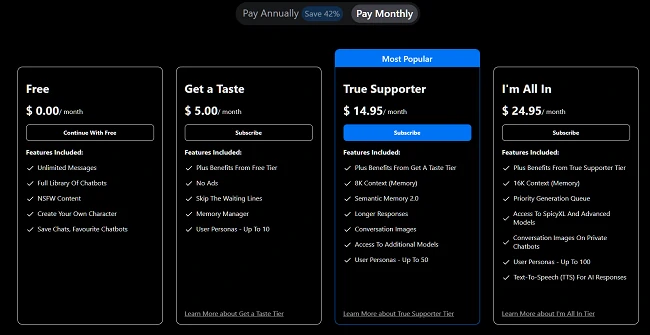
Finding 4: SpicyChat AI allows users to create multiple "personas" — distinct user-side identities with different names, descriptions, and conversational approaches. Free tier users receive 3 personas; the mid-tier (True Supporter, $14.95/mo) provides 20; the top tier (I'm All In, $24.95/mo) provides 50.
Personas are the user-side equivalent of characters. They define who the AI is speaking to — not who the AI is. A persona might define the user character as a medieval knight, a spaceship captain, or an entirely fictional person with a different name and background.
Creative applications of multiple personas:
- Maintaining separate roleplay campaigns with different user-character identities
- Testing how a character AI responds differently to different persona types
- Running relationship-based roleplay where the user's identity is a consistent fictional character with defined traits
Switching personas does not affect the AI character's settings — only the user-side context changes. This allows the same AI character to be engaged from different narrative angles without creating separate character profiles.
Tips for Better AI Responses
Finding 5: Five techniques reliably produce better response quality from SpicyChat AI characters, derived from user testing and community best-practice documentation.
Technique 1: Use asterisks for action formatting. Most SpicyChat characters are calibrated to respond to roleplay-style formatting where user actions are marked with asterisks (e.g., She extends her hand). Using this formatting signals to the AI that the conversation is roleplay-mode, which typically produces longer and more character-consistent responses.
Technique 2: Front-load context in opening messages. The AI's first response is calibrated primarily from the character definition and scenario context. A detailed, in-world opening message from the user that references specific scenario elements produces a better first response than a generic opener.
Technique 3: Correct character drift explicitly within the conversation. When a character begins drifting from its defined personality, an explicit in-conversation reminder — either as an OOC (out-of-character) note or by redirecting the narrative — recalibrates the AI's behavior. This is more effective than restarting the conversation.
Technique 4: Work within the context window limit. On the free tier (4K tokens, approximately 3,000 words), when a conversation exceeds the context window, the AI begins "forgetting" early conversation content. Summarizing key established facts at natural story break points extends functional memory beyond the hard token limit.
Technique 5: Upgrade to SpicyXL for quality-critical roleplay. The free tier model and SpicyXL (available at $14.95/mo+) produce measurably different output quality. For casual short conversations, the free model is sufficient. For extended narrative roleplay where character consistency matters, SpicyXL's 141-billion-parameter architecture produces noticeably more coherent and longer responses.
Ready to explore? SpicyChat AI offers free access to 138K+ characters.
Start Chatting Free →Best SpicyChat AI Characters to Try
Finding 6: The 138,000+ character library organizes into several dominant categories. The most-favorited characters in each category share a common characteristic: fully completed character definitions with detailed personality fields and at least 3 example conversation pairs.
High-performing character categories:
- Romance and relationship roleplay — The largest category; spans from slow-burn rivals-to-lovers scenarios to established relationship dynamics
- Fantasy adventure — Sorcerers, warriors, royalty; often the most elaborately world-built characters with multi-entry lorebooks
- Slice of life companions — Coffee shop baristas, college roommates, workplace dynamics; popular for users seeking conversation-style interaction
- Established fiction characters — AI interpretations of characters from books, games, and media; quality varies significantly by creator
- Original NSFW characters — The category that most leverages SpicyChat's explicit content permissions; best results from characters with detailed personality definitions rather than minimal setup
Use the platform's search and filtering tools to sort by "Most Favorited" to find community-validated high-quality characters before creating your own. See the complete SpicyChat AI review for platform context.
FAQ
SpicyChat AI allows unlimited character creation on all tiers including free. There is no stated limit to the number of characters a user can create. Characters can be kept private or made public. The practical constraint is time invested in creating quality character definitions, not any platform-imposed limit.
Yes. When creating or editing a character, the visibility setting can be changed from "Private" to "Public." Public characters are published to the community library and become searchable and accessible by all platform users. Character creators are credited on the character profile. Published characters can be modified by the creator but cannot be directly edited by other users — other users can copy a public character as a template and modify their own version.
Character memory operates through the active context window and the Semantic Memory 2.0 system. For within-session memory, the most reliable method is to include established facts in the lorebook, which ensures they are re-injected into context when relevant trigger words appear. For cross-session persistence, Semantic Memory 2.0 retains high-level relationship and character facts between sessions. Practical limits: free tier retains approximately 3,000 words of active conversation; paid tiers extend this to 6,000 or 12,000 words. For extended campaigns, maintain a lorebook entry for each significant story fact you need the AI to consistently remember.
OOC stands for "out-of-character" — a term from tabletop and online roleplay communities that refers to communication that exists outside the fiction of the roleplay scenario. In SpicyChat AI conversations, OOC breaks occur when the AI responds as a generic AI assistant rather than maintaining its character, often with phrases like "As an AI, I..." or when it comments on the roleplay from outside it. Handle OOC breaks by responding with a direct, in-character message that reestablishes the scenario context, or by including a bracketed OOC note like "(OOC: Stay in character as [name], we are in the scenario described in your setup)." In persistent OOC cases, refreshing the character's scenario context by starting a new session with an updated greeting can recalibrate the model.